
Unexpected Token in JSON at Position 0
Quick answer: Unexpected token < in JSON at position 0 means the parser hit a < as the very first character — so the response was almost always an HTML page, not JSON (a 404, 500, or login redirect). The fix is to look at what you actually received, not to change your parser. Paste the raw response into the JSON Debugger to see exactly what came back, then fix the request that returned HTML.
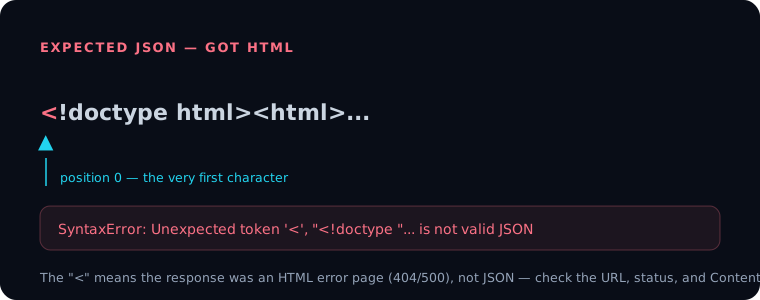
What "position 0" is telling you
The position number is a zero-based index into the string you handed to JSON.parse(). Position 0 is the first character. Valid JSON can only start with {, [, ", a digit, -, or the words true/false/null. A < at position 0 is not any of those — it's the opening of an HTML tag like <!doctype html> or <html>.
So the parser is right: that text isn't JSON. The bug is upstream, in whatever produced the response.
Why you got HTML instead of JSON
The usual culprits, in rough order of frequency:
- The request failed and the server returned an HTML error page. A 404 or 500 often renders a styled error page, which starts with
<. - You hit the wrong URL — a web page route instead of an API endpoint.
- You're not authenticated and got redirected to an HTML login page.
- A proxy, captive portal, or rate limiter intercepted the request and returned its own HTML.
In every case the status code and Content-Type header tell the real story before you ever call JSON.parse().
How to fix it
Check the response before parsing:
const res = await fetch("/api/users");
if (!res.ok) {
  throw new Error(`Request failed: ${res.status}`);
}
const ctype = res.headers.get("content-type") || "";
if (!ctype.includes("application/json")) {
  const text = await res.text();
  throw new Error(`Expected JSON, got: ${text.slice(0, 80)}`);
}
const data = await res.json();
This turns the cryptic Unexpected token < into a clear message that names the status and shows the start of the body — usually enough to spot the wrong URL or the auth redirect immediately.
If you already captured the raw string and want to confirm what's in it, drop it into the JSON Debugger; it points at the failing position and shows the surrounding characters so an HTML page is obvious at a glance.
Other "unexpected token" variants
The same error appears with different characters when the body really is meant to be JSON but is malformed:
Unexpected token '}'— usually a trailing comma.Unexpected token o in JSON— you passed an object toJSON.parse()(it stringifies to[object Object]); parse the original string, or skip parsing entirely.Unexpected token '— single quotes instead of double quotes.
For the full catalogue of syntax slip-ups, see Common JSON Mistakes.
Frequently asked questions
What does "Unexpected token < in JSON at position 0" mean?
The first character of the response is <, which starts an HTML tag. Your code expected JSON but received an HTML page — typically an error page, a redirect, or the wrong URL.
How do I fix the unexpected token error?
Don't change the parser. Check response.ok and the Content-Type header first, and log the raw body. Fix the request so it returns JSON (correct URL, valid auth, handle non-200 statuses).
Why does my API return HTML instead of JSON? Most often the request failed (404/500) and the server rendered an HTML error page, or you were redirected to a login page because you weren't authenticated.
What does position 0 mean in a JSON error? Position is a zero-based character index into the string being parsed. Position 0 is the very first character, so the problem is at the start of the input.