JSON vs JSONL (NDJSON): When to Use Each
Quick answer: JSON is one self-contained document — usually a single object or array. JSONL (JSON Lines, identical to NDJSON) is one complete JSON value per line, with no enclosing array. JSONL streams and appends line by line; JSON must be read and parsed all at once. Use JSON for a single payload; use JSONL for logs, datasets, and anything processed incrementally. Convert and inspect either with the JSON Converter.
The structural difference
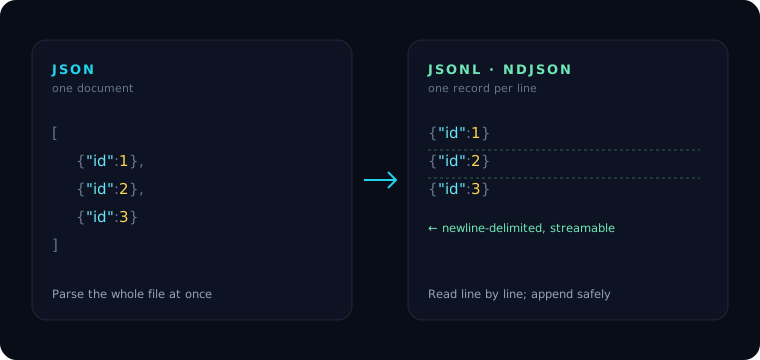
A JSON file holds one value. To store many records you wrap them in an array:
[
  {"id": 1, "name": "Ada"},
  {"id": 2, "name": "Grace"},
  {"id": 3, "name": "Alan"}
]
A JSONL file holds one record per line, each a standalone JSON value, with no surrounding brackets and no commas between lines:
{"id": 1, "name": "Ada"}
{"id": 2, "name": "Grace"}
{"id": 3, "name": "Alan"}
Each line parses on its own. There is no top-level array, so the file as a whole is not a single valid JSON document — and that's the point.
Why JSONL exists
The line-per-record format unlocks things a monolithic array can't do:
- Streaming. You can read and process one line at a time without loading the whole file into memory — essential for multi-gigabyte datasets. See Performance with Large JSON Files.
- Appending. Adding a record is just writing a new line. Appending to a JSON array means rewriting the closing
]— awkward and error-prone. - Unix-friendliness.
grep,head,tail,wc -l, andsedall work naturally because each record is a line. - Fault tolerance. If a write is cut off, you lose one line, not the whole document.
This is why JSONL dominates log files, ML training data, data exports, and event streams.
When to use each
| Use JSON when… | Use JSONL when… |
|---|---|
| You have one object or a small array | You have many independent records |
| The whole value is needed at once (an API response, a config) | Records are processed/streamed one at a time |
| Consumers expect a single document | The file is appended to over time (logs, events) |
| Size is small enough to load in memory | The dataset is large or unbounded |
Converting between them
Going from a JSON array to JSONL is "write each element on its own line"; going back is "wrap the lines in [...] with commas." The JSON Converter does both, and you can format or minify each line with the JSON Formatter. Note that tools expecting strict JSON will reject a raw JSONL file — feed them one line at a time.
Frequently asked questions
Are JSONL and NDJSON the same thing? Effectively yes. Both mean newline-delimited JSON — one complete JSON value per line. "JSONL" and "JSON Lines" are the more common names today; NDJSON is an older label for the same format.
Is a JSONL file valid JSON? No. The file as a whole isn't a single JSON document because it has no enclosing array. Each individual line, however, is valid JSON on its own.
When should I use JSONL instead of JSON? Use JSONL for large datasets, logs, and event streams that are processed or appended one record at a time. Use plain JSON for a single payload that's consumed all at once.
How do I convert a JSON array to JSONL? Write each array element on its own line with no trailing commas. The JSON Converter automates this, and reverses it by wrapping the lines back into an array.
Related tools