Reading the Position in a JSON Parse Error
Quick answer: The number in a JSON error like at position 42 is a zero-based character index into the exact string you parsed — including spaces and newlines. The break is usually at that character or just before it. Counting by hand is error-prone, so paste the document into the JSON Debugger, which jumps the cursor straight to the reported position.
How positions are counted
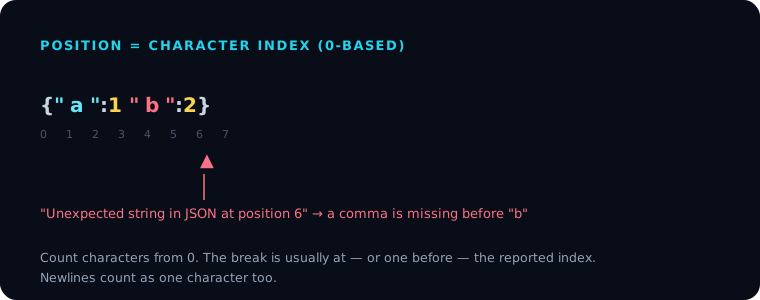
Position 0 is the first character. Every character counts the same — letters, braces, quotes, spaces, and newlines all advance the index by one. There is no special handling for indentation or line breaks; a \n is one position like any other.
{"a":1 "b":2}
The parser reads {, "a", :, 1, then a space, then expects a comma — but finds ". That second quote is at index 7, so you'll see something like Unexpected string in JSON at position 7. A comma is missing right before it.
"At" vs "just before"
The reported position is where the parser gave up, which is typically the first character it couldn't accept. The actual mistake is often the character or two before it — a missing comma, an unclosed string, or an extra bracket. So when you land on the position, look left as well as right.
Position vs line and column
JSON.parse() in browsers and Node reports a flat character index, not a line and column. For a big multi-line file, an index of 1842 is hard to locate by eye. Two ways to convert it:
- Use a tool. The JSON Debugger and most editors translate the index into a line/column and move the cursor there.
- Count newlines programmatically if you need to do it in code:
function lineColFromPos(text, pos) {
  const before = text.slice(0, pos);
  const line = before.split("\n").length;
  const col = pos - before.lastIndexOf("\n");
  return { line, col };
}
Newer JavaScript engines also attach a richer message (for example, including a line and column in some environments), but the portable signal is still the character position.
A reliable debugging loop
- Read the position from the error message.
- Jump to it — paste into the JSON Debugger rather than counting.
- Inspect that character and the one before it.
- Fix the most likely cause: a trailing comma, a single quote, an unquoted key, or a missing comma.
- Re-run through the JSON Validator to confirm.
For the full list of what tends to break at a given position, see Common JSON Mistakes.
Frequently asked questions
Is the JSON position zero-based or one-based?
Zero-based. Position 0 is the first character of the string you passed to JSON.parse().
Do spaces and newlines count toward the position? Yes. Every character advances the index by one, including whitespace and line breaks. There's no separate line/column in the standard error.
The character at the position looks fine — why? The reported position is where the parser stopped, not always where the mistake is. The real error is often one or two characters earlier, such as a missing comma before the highlighted token.
How do I turn a position into a line and column? Slice the text up to the position and count the newlines for the line number; the column is the offset since the last newline. Tools like the JSON Debugger do this for you.