
How to Flatten Nested JSON
Quick answer: Flattening turns nested JSON into a single-level object whose keys are dotted paths — {"user":{"address":{"city":"Paris"}}} becomes {"user.address.city":"Paris"}. It's how you make deep data easy to query, diff, or export to CSV. Watch out for arrays and key collisions. Explore a document's nesting first with the JSON Structure Analyzer.
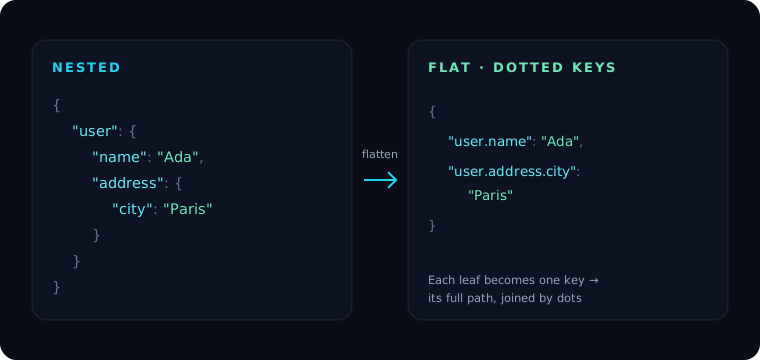
What flattening does
Each leaf value (a string, number, boolean, or null) keeps its value, but its key becomes the full path from the root, joined by a delimiter — usually .:
{ "user": { "name": "Ada", "address": { "city": "Paris" } } }
flattens to:
{ "user.name": "Ada", "user.address.city": "Paris" }
Now every value is one key lookup away, with no traversal. This is exactly the shape that CSV export needs, since CSV columns are flat.
The tricky parts
Arrays. There's no single right answer for {"tags": ["a", "b"]}. Common conventions:
- Index into the path:
tags.0 = "a",tags.1 = "b". - Keep the array as a value at
tags. - Join into a string:
tags = "a,b".
Pick one and apply it consistently — and remember that index-based keys make the flat shape sensitive to array order.
Key collisions. If a real key already contains a dot ({"a.b": 1}), it can collide with a flattened path. Choose a delimiter your keys don't use (some tools use / or __), or escape literal dots.
Round-tripping. Flattening is reversible only if your unflatten logic agrees on the same delimiter and array convention. Don't assume a flattened blob can be re-nested by a different tool.
How to flatten
In the browser: paste your JSON into the JSON Structure Analyzer to see every path, or use Minimal Mode to pull just the paths you need.
With jq on the command line (objects only):
jq '[leaf_paths as $p | {key: ($p | join(".")), value: getpath($p)}] | from_entries' data.json
In JavaScript, a small recursive helper:
function flatten(obj, prefix = "", out = {}) {
  for (const [k, v] of Object.entries(obj)) {
    const key = prefix ? `${prefix}.${k}` : k;
    if (v && typeof v === "object" && !Array.isArray(v)) {
      flatten(v, key, out);
    } else {
      out[key] = v;
    }
  }
  return out;
}
This one keeps arrays as values; extend the Array.isArray branch if you want indexed paths. For querying deep data without flattening, see JSONPath and Querying JSON with jq.
Frequently asked questions
What does it mean to flatten JSON?
It converts nested objects into a single-level object where each key is the full dotted path to a leaf value, e.g. user.address.city. This makes deep values easy to access and export.
How are arrays handled when flattening?
There's no universal rule. Tools either add an index to the path (tags.0), keep the array as a value, or join it into a string. Choose one convention and apply it consistently.
Can I unflatten dotted keys back into nested JSON? Yes, if the unflatten step uses the same delimiter and array convention as the flatten step. Mismatched conventions (especially around dots inside keys) break the round-trip.
Why flatten JSON at all? Flat, dotted-key data is far easier to query, diff, and export to flat formats like CSV, and it removes the need to write nested traversal code for simple lookups.